

How to Optimize Your WordPress Site for AI Search (ChatGPT, Perplexity, Google AI Overviews)
To optimize a WordPress site for AI search, you need to do six things: let AI crawlers access your pages, get indexed in Google and Bing, write answer-first content, add structured data, build clear authority signals, and keep pages fast and fresh. None of this replaces traditional SEO. It builds on it, because AI search tools mostly pull from pages that already rank, load well and answer questions clearly.
This guide walks through each step for WordPress specifically, including the plugins, settings and checks that matter.
TL;DR: the AI search optimization checklist
- Check that your robots.txt, security plugin and CDN are not blocking AI search crawlers.
- Submit your site to Google Search Console and Bing Webmaster Tools.
- Open every section with a direct, quotable answer.
- Add Article, FAQPage, Organization and author schema.
- Show real expertise with author bios, original examples and sources.
- Keep pages fast, server-rendered and regularly updated.
- Earn mentions on other trusted sites.
- Track AI referrals and test your target prompts monthly.
What is AI search, and how is it different from Google?
AI search tools answer a question directly instead of only listing links. Three matter most for most businesses:
- ChatGPT search retrieves live web results and shows an answer with source links.
- Perplexity searches the web for every query and attaches numbered citations to its answer.
- Google AI Overviews and AI Mode generate a summary at the top of Google results and link to supporting pages.
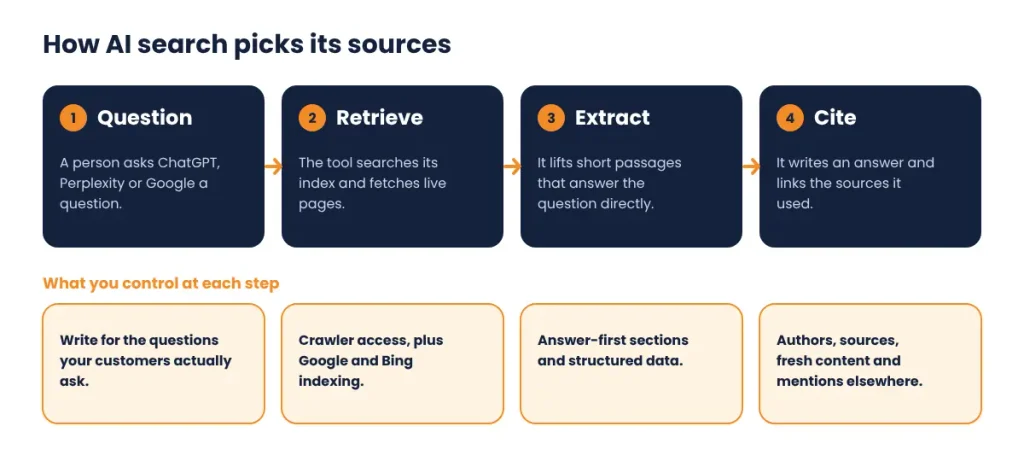
The key difference is that these tools do not rank ten blue links. They retrieve a handful of pages, extract passages, and cite the sources they used. Your goal shifts from “rank first” to “be one of the sources the answer is built from.” This practice is often called answer engine optimization (AEO) or generative engine optimization (GEO).
Step 1: Make sure AI crawlers can reach your WordPress site
If a crawler cannot fetch your page, you cannot be cited. Many WordPress sites block AI bots by accident through security plugins, firewall rules or an old robots.txt file.
Here are the main crawlers to know:
| Crawler | Operated by | What it does |
|---|---|---|
| OAI-SearchBot | OpenAI | Finds pages to show in ChatGPT search results |
| GPTBot | OpenAI | Collects content that may be used for model training |
| ChatGPT-User | OpenAI | Fetches a page when a user asks ChatGPT to open it |
| PerplexityBot | Perplexity | Indexes pages for Perplexity answers |
| Perplexity-User | Perplexity | Fetches pages on demand for a user’s query |
| Googlebot | Crawls for Search, which also feeds AI Overviews and AI Mode | |
| Google-Extended | A control for Gemini training and grounding; it does not affect Search inclusion | |
| Bingbot | Microsoft | Crawls for Bing, which many AI tools rely on |
Crawler names and behavior change, so confirm them against each company’s current documentation before you edit rules.
How to check on WordPress:
- Open
yoursite.com/robots.txtand look forDisallowrules that target these bots or a blanketDisallow: /. - In Settings > Reading, confirm “Discourage search engines from indexing this site” is unchecked.
- Check your SEO plugin (Yoast, Rank Math or All in One SEO) for sitewide
noindexsettings. - Review your security plugin and CDN or WAF (Cloudflare, Wordfence, Sucuri) for bot-blocking or “AI bot” rules, and allow the search crawlers you want.
- Fetch a key page with a plain
curlrequest and confirm the main text appears in the raw HTML.
A simple robots.txt that allows AI search crawlers looks like this:
User-agent: OAI-SearchBot
Allow: /
User-agent: PerplexityBot
Allow: /
User-agent: Googlebot
Allow: /
Sitemap: https://yoursite.com/sitemap_index.xml
You can still choose to block training-only crawlers such as GPTBot if you do not want your content used for model training. Blocking training bots and allowing search bots is a legitimate business decision. Just make it deliberately, and note that blocking search crawlers means you will not be cited.
Step 2: Get indexed in Google and Bing
AI tools lean on existing search indexes. Google AI Overviews draw from Google’s index, and several other assistants rely on Bing’s index or their own crawls.
- Verify your site in Google Search Console and submit your XML sitemap.
- Verify your site in Bing Webmaster Tools. You can import your Search Console setup in a few clicks.
- Use your SEO plugin’s XML sitemap, and make sure it only lists canonical, indexable URLs.
- Turn on IndexNow (built into Rank Math and available for Yoast and others) so Bing and participating engines learn about new and updated pages quickly.
- Fix indexing issues first: soft 404s, accidental noindex tags, redirect chains and duplicate pages. If you have overlapping posts competing for the same keyword, consolidate them. Duplicate content makes it harder for any engine to pick your best page.
Step 3: Write answer-first content
AI systems extract passages. The easier a passage is to lift out and still make sense, the more likely it is to be cited.
Use this structure on every post:
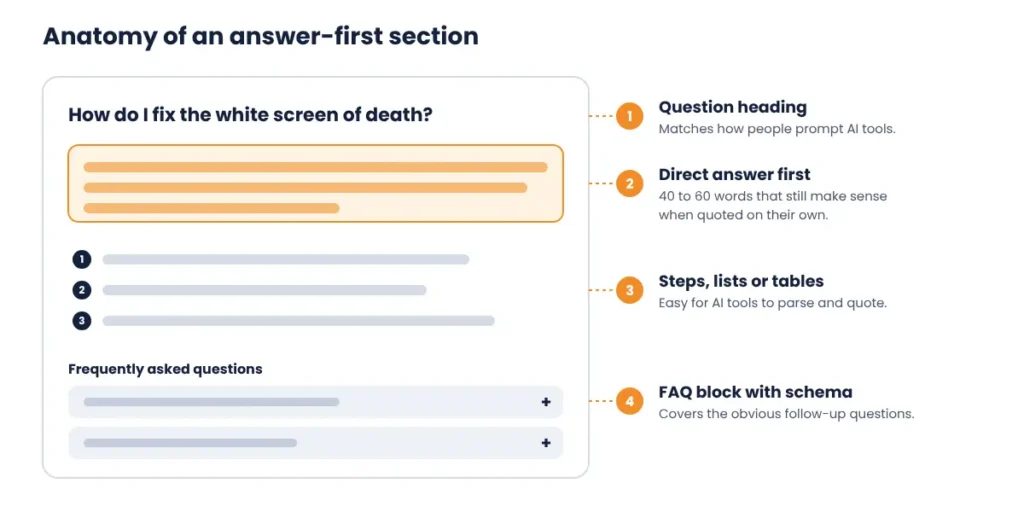
- Lead with the answer. Put a direct response in the first one or two sentences under each heading, ideally 40 to 60 words, before you add context.
- Write headings as real questions. “How do I fix the WordPress white screen of death?” matches how people prompt AI tools and search.
- Keep paragraphs short. Two to four sentences, one idea each.
- Make passages self-contained. Avoid “as mentioned above.” Name the subject in each section so it makes sense when quoted alone.
- Use lists, steps and tables for processes, comparisons and specifications. They are easy to parse and quote.
- Define terms plainly. “Schema markup is code that tells search engines what a page is about” is exactly the type of sentence that gets reused.
- Cover the follow-up questions. AI tools often expand a query into related sub-questions. A page that answers the main question and the obvious next three is more useful to cite.
Add specific details whenever you can: version numbers, settings paths, costs, timeframes and outcomes from real projects. Vague, generic content is the easiest for AI to replace and the least likely to be cited.
Step 4: Add structured data (schema) in WordPress
Structured data does not guarantee citations, but it removes ambiguity about who wrote a page, what it covers and which organization stands behind it.
Schema types worth adding:
- Article or BlogPosting with author,
datePublishedanddateModified - Organization with your name, logo, contact details and
sameAslinks to your official profiles - Person for your authors, linked to their bio pages
- FAQPage for pages with genuine question-and-answer sections
- BreadcrumbList to clarify your site structure
- Service or LocalBusiness on service pages, where relevant
How to do it on WordPress:
- Use the schema features in Yoast SEO, Rank Math or All in One SEO. All three output Article, Organization and breadcrumb markup with little setup.
- Fill in the Organization and author details completely. Empty fields mean weak entity signals.
- Add FAQ blocks to relevant posts. Only mark up questions that are visibly answered on the page.
- Validate with Google’s Rich Results Test and the Schema Markup Validator, and fix errors and warnings.
Markup must match what is visible on the page. Do not add schema for content users cannot see.
Step 5: Build authority and trust signals (E-E-A-T)
AI tools prefer sources that look trustworthy. Make your expertise obvious.
- Show real authors. Add a named author with a photo, a short bio, relevant credentials and a link to an author page.
- Publish original material: case studies, screenshots from real projects, benchmarks, checklists and your own data.
- Cite your sources. Link to official documentation and reputable studies, and describe claims accurately.
- Strengthen your About, Contact and Reviews pages. Clear business details, real client reviews and a visible physical or company presence all help.
- Be consistent. Use the same business name, description and links everywhere: your site, Google Business Profile, LinkedIn and directories.
- Stay in your lane. A site that covers a topic in depth, with well-linked supporting articles, signals more authority than a scattered blog.
Step 6: Fix the technical foundation
- Speed and Core Web Vitals. Use caching, image compression, modern formats like WebP and a lean theme. Read our guide to website speed and how it affects your WordPress site.
- Server-rendered content. Crawlers do not always execute JavaScript. Make sure headings, body text and links appear in the raw HTML, which is a particular risk with heavily scripted page builders and lazy-loaded content.
- Clean HTML structure. One H1 per page, logical H2 and H3 order, and descriptive alt text on images.
- Canonical tags and clean URLs. Short, descriptive slugs, one canonical URL per page.
- Internal linking. Link each post to its parent topic page and to related posts with descriptive anchor text. This helps crawlers and shows topical depth. Our guide to improving your WordPress SEO ranking covers the fundamentals.
- Security and uptime. A hacked or frequently down site loses crawl trust. Keep WordPress, themes and plugins updated.
- Mobile usability. Test key pages on a phone.
Video and transcripts can also give AI systems more to work with. See our tips on WordPress video SEO strategies.
Step 7: Keep your content fresh
AI tools that retrieve live results favor current information, especially for fast-changing topics.
- Review your best pages every three to six months.
- Update facts, screenshots, version numbers and links, then show a real “Last updated” date and keep
dateModifiedaccurate in your schema. - Do not change the date without changing the content. Fake freshness does not help and erodes trust.
- Prune or merge outdated, thin posts so your strongest pages carry the signal.
Step 8: Earn mentions beyond your own site
AI answers often reflect what the wider web says about a brand or topic, not just what a brand says about itself.
- Get listed in relevant industry directories and review platforms.
- Contribute expert comments, guest articles and podcast appearances.
- Take part in communities where your audience asks questions, such as forums, Reddit and LinkedIn, and add helpful answers rather than promotion.
- Publish something others want to cite, like original research, a free tool or a definitive checklist.
- Encourage genuine client reviews.
Unlinked brand mentions and links from trusted sites both help build the recognition AI systems associate with your name.
Step 9: What about llms.txt?
llms.txt is a proposed plain-text file at the root of your site that lists your key pages for language models. Adoption is growing, but major AI search providers have not confirmed that they use it for ranking or citations. It is cheap to add and unlikely to hurt, so treat it as optional housekeeping, not a growth lever. Spend your time on crawl access, content quality and authority first.
Step 10: Measure your AI search visibility
Tracking AI visibility is still imperfect, but you can get a useful picture.
- GA4 referral traffic. Look for sources such as chatgpt.com, perplexity.ai and gemini.google.com. Create a custom channel group so you can watch them together.
- Manual prompt testing. Once a month, run your 15 to 20 most important questions in ChatGPT, Perplexity and Google, and record whether you are cited, who is cited instead, and what they say.
- Search Console. Track impressions and clicks for question-style queries. Google includes AI feature traffic in its Search Console performance data.
- Server logs. Check which AI crawlers are visiting, and which pages they fetch or fail on.
- Brand search trend. A rise in branded searches often follows AI mentions.
Results vary by prompt, location and day, so look at trends, not single results.
Common mistakes to avoid
- Blocking all bots in robots.txt or a firewall without understanding what each one does
- Publishing generic, AI-written content with no original insight or named author
- Splitting one topic across many thin, overlapping posts
- Adding FAQ schema for questions that do not appear on the page
- Burying the answer under a long introduction
- Relying on a single tactic, such as llms.txt, instead of fundamentals
- Ignoring Bing
WordPress AI search optimization checklist
- Robots.txt, security plugin and CDN allow the search crawlers you want
- Site verified in Google Search Console and Bing Webmaster Tools
- XML sitemap submitted and IndexNow enabled
- Key posts open each section with a direct answer
- Headings written as questions where it makes sense
- Article, Organization, Person and FAQ schema in place and validated
- Named authors with bios and author pages
- Core Web Vitals passing on key templates
- Content visible in raw HTML
- Internal links connect each post to its topic hub and related posts
- Top pages reviewed and updated every three to six months
- AI referrals tracked in GA4 and monthly prompt tests logged
Frequently asked questions
What is AI search optimization?
AI search optimization, also called answer engine optimization (AEO) or generative engine optimization (GEO), is the practice of structuring and promoting your content so AI tools such as ChatGPT, Perplexity and Google AI Overviews can find it, understand it and cite it in their answers.
Is AI search optimization different from SEO?
It overlaps heavily. Crawlability, indexing, quality content, authority and speed all still matter. The differences are a stronger focus on direct, extractable answers, structured data, brand mentions across the web and measuring citations as well as rankings.
How do I get my WordPress site cited by ChatGPT?
Allow OAI-SearchBot and Bingbot to crawl your site, get indexed in Bing, publish clear answer-first content with named authors and sources, and build mentions on other trusted sites. There is no way to guarantee a citation, but these steps improve your chances.
Should I block GPTBot and other AI crawlers?
That depends on your goals. Training crawlers like GPTBot collect content that may be used to train models, while search crawlers like OAI-SearchBot and PerplexityBot are used to surface and cite your pages. Many sites block training bots and allow search bots. Blocking search bots means you will not appear in those results.
Does schema markup help with AI Overviews?
Schema does not guarantee inclusion, but it helps search engines understand your content, authors and organization, which supports eligibility and trust. Make sure the markup is accurate and matches visible content.
Which WordPress plugin is best for AI search optimization?
No single plugin does it all. Yoast SEO, Rank Math and All in One SEO handle sitemaps, schema and robots controls. Pair one of them with a caching or performance plugin and a security tool that does not block legitimate crawlers.
How long does it take to see results?
Fixing crawler access and indexing can show effects within weeks. Building authority and earning citations typically takes several months of consistent publishing and updates.
Conclusion
Optimizing your WordPress site for AI search comes down to being accessible, clear and credible. Let the right crawlers in, get indexed, answer questions directly, mark up your content, prove your expertise and keep everything fast and current. Then measure what happens and adjust.
If you would like help auditing your crawl settings, schema and content structure, our WordPress SEO services include AI search readiness reviews. Get in touch and we will show you where to start.